
Tracking Usage
See your balance, what you've spent, and where it went. My credit usage shows your included-credit consumption, your on-demand balance, and on-demand spend against your cycle cap — split across workspace and personal pools. View ledger opens the full transaction history.
Model Match records every credit movement, so you can always see exactly where your balance went. Your personal view lives at My credit usage; workspace admins get the org-wide view at Workspace credit usage.
My credit usage
The My credit usage page is your dashboard for balance, recent activity, and usage trend. A coverage banner at the top tells you at a glance whether you're funded — e.g. "You're covered — 1,995 workspace plan credits left (resets Jul 25, 2026)."
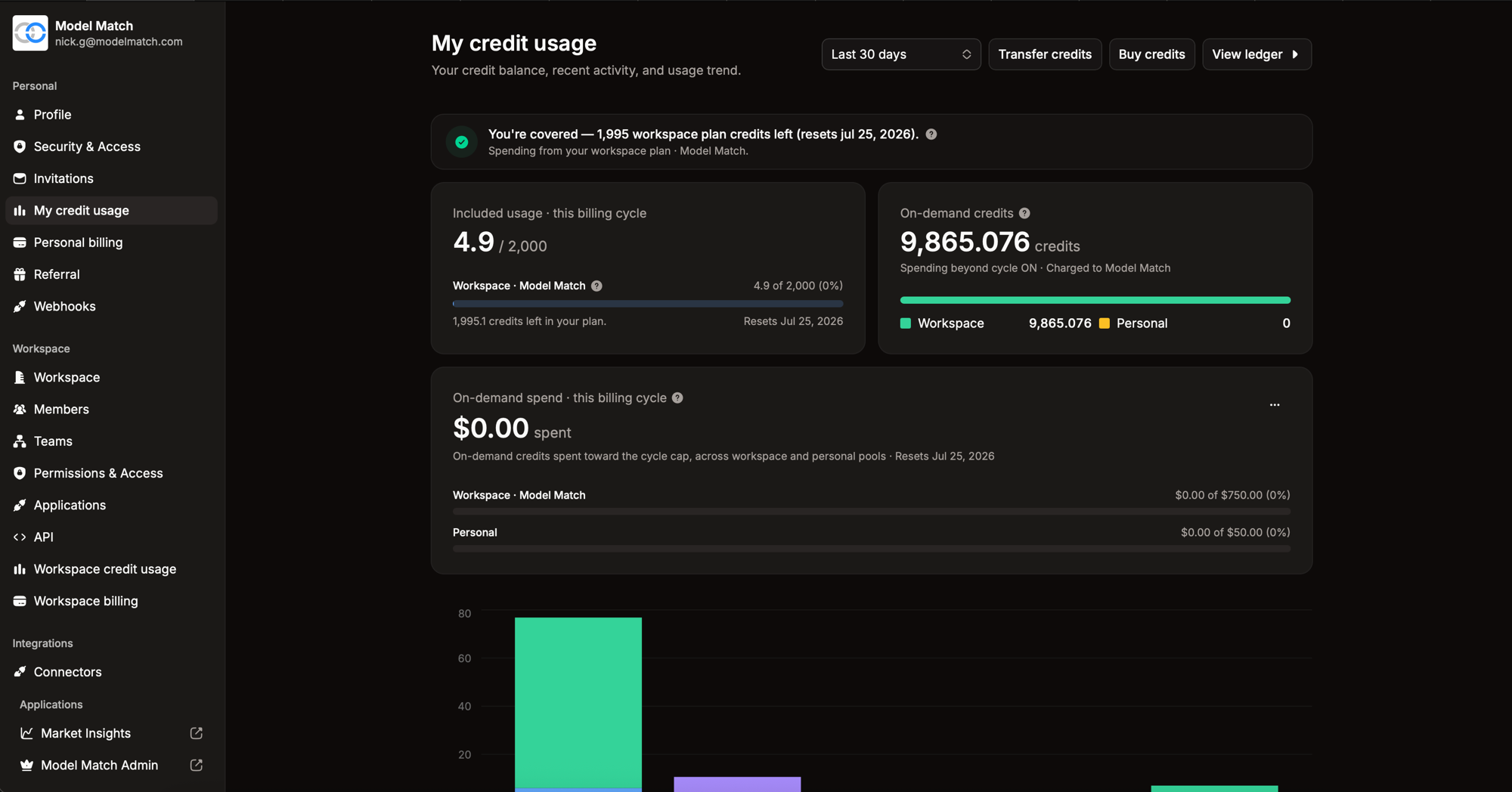
It breaks your usage into three cards:
Included usage · this billing cycle
Your consumption of the cycle bucket — the credits included with your plan. Shows how many you've used out of your allowance (e.g. 4.9 / 2,000), how many are left, and when the cycle resets. Unused included credits don't roll over; the counter resets on the reset date.
On-demand credits
Your rollover balance — credits you've bought or been given. The Spending beyond cycle toggle controls whether this balance is drawn down once your included credits run out; with it on, usage that exceeds the cycle keeps flowing instead of failing. The balance is split across two pools — your workspace pool and your personal pool — so you can see which credits would cover the overflow.
On-demand spend · this billing cycle
How much you've spent beyond your included credits this cycle, in dollars, against your cycle cap — the ceiling on on-demand spend per billing period. It's tracked separately for the workspace pool and the personal pool (e.g. Workspace $0.00 of $750.00, Personal $0.00 of $50.00). When a pool reaches its cap, on-demand spend from that pool stops until the next cycle. Adjust caps where you configure auto-purchase.
Use the date-range selector (e.g. Last 30 days) to scope the usage-trend chart at the bottom of the page, and the per-pool breakdown above it.
The credit ledger
Click View ledger to open the full transaction history. Every movement — usage debits, monthly subscription_grants, purchases, auto_purchases, gifts, transfers, refunds, adjustments, and cycle expiry — appears as a timestamped line with its amount and type. The types map one-to-one to the list in Where credits come and go.
Each usage debit records what it paid for, so you can trace a charge back to the API call, enrichment, or export that produced it.
Workspace-wide usage
Owners and admins get the org-level rollup at Workspace credit usage — the same cards and ledger, aggregated across every member, so you can see total consumption and which members are driving it. Pair it with per-member allocations and limits to keep spend in check.
Tracking usage from the API
If you're billing your own users or reconciling spend programmatically, the API hands you the cost of each metered call directly — no need to scrape the ledger:
GET /v1/me/creditsreturns your balance split by bucket, your cycle allowance and on-demand unit price, and ledger totals over a date window — the same figures the My credit usage page shows.- Enrichment responses carry
chargedandreason, and bulk jobs reportchargedCount. See Property Enrichment. - Bulk delivery jobs report
creditsChargedand acreditLedgerIdonce complete. See Bulk Delivery. - A
402response tells you the exactbalanceandcostat the moment a call couldn't be funded.
Related
Plans & Subscriptions
Your plan sets your monthly credit allowance, seat count, and daily limits on AI features. Workspace plans bill the organization; personal plans bill an individual. Compare tiers, upgrade, downgrade, or cancel from Workspace billing or Personal billing — live pricing always shown there.
TypeScript SDK
Type-safe client for the Model Match API with full IntelliSense support.